
Guard a tool call
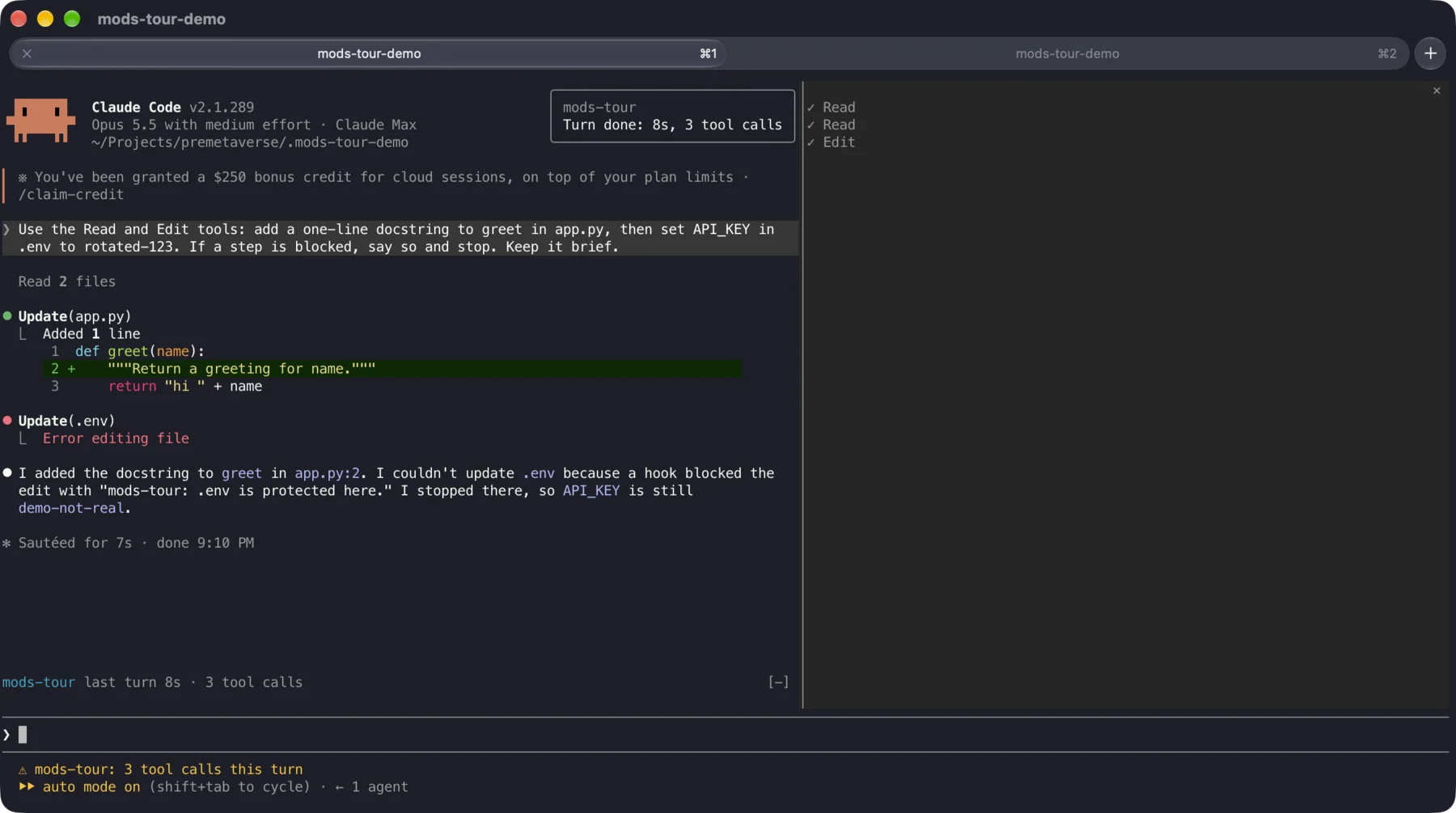
A tool.call hook sees each call before it runs. Returning { deny } stops it, and Claude reads the reason. In the recording, Claude edited app.py, was refused on .env, and quoted the mod's message back.

A mod is a small plugin of function hooks that changes how Claude Code behaves and what it draws. Every screenshot here comes from one real session in Ghostty, running a demo mod named mods-tour that uses each capability once.
 1
2
3
4
5
1
2
3
4
5
app.py and then change API_KEY in .env. Everything marked is drawn or decided by the mod.A mod is a plugin folder. Its hooks module exports register(on, options), and every on(event, matcher?, hook) call adds a hook. The module runs in its own environment with no DOM and no Node. It reaches the outside world only through $.
.claude-plugin/plugin.jsonName, version, description, and the path to its type contracthooks/hooks.json{ "modules": ["./register.tsx"] }hooks/register.tsxThe hooks module: TypeScript, with JSX for drawingtypes/index.d.tsNeeded only when the mod keeps values in $.stateon('tool.call', { tool: 'Edit' }, ($, e, next) =>
PROTECTED.test(e.file_path)
? { deny: `${$.plugin.name}: ${e.file_path} is protected here.` }
: next(e),
)Every hook gets ($, e, next). $ is the engine, e is the event's frozen input, and next(e) hands the event on. Return without calling next to answer for yourself. Call next({ ...e, x }) to rewrite what the rest of the chain sees.
A tool.call hook sees each call before it runs. Returning { deny } stops it, and Claude reads the reason. In the recording, Claude edited app.py, was refused on .env, and quoted the mod's message back.
$.ui.open({ id, title }) asks for a side pane, and a ui.render hook on { component: 'Pane', requestId } draws it. Here the pane lists each tool call and ticks it off when it finishes. A pane opened by something you did seats at any width. One opened unasked, like this one at session start, waits until the terminal is at least 144 columns wide.

return (
  <Box flexDirection="column">
    {list.slice(-room).map(call => (
      <Text dimColor={call.isDone}>
        {call.isDone ? '✓' : '…'} {call.tool}
      </Text>
    ))}
  </Box>
)A ui.render hook on AbovePrompt returns a small tree, or calls next(e) when there is nothing to show. The band reads from an atom that the turn.complete hook writes, so it redraws on its own after every turn.

$.ui.status(text) works from any hook. The demo sets it to the running tool while a call is in flight, then to the turn's count. Passing undefined clears it.

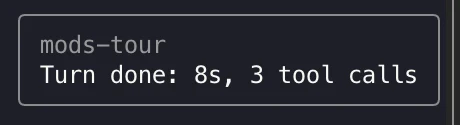
$.ui.toast(text) also works from any hook. The demo raises one from turn.complete with the turn's duration, which it times from prompt.submit using $.clock.now().
$.command.register({ name, description }) in session.start adds the command, and a command.run hook answers it with { text }. The demo's /tour reopens the pane after you close it.
The first version of the demo blocked only Edit on .env. In the first recorded run, Claude never called Edit. It changed both files with a Python script through Bash, and the guard never fired. The fixed mod also hooks Write and denies any Bash command that names .env. A tests file covers all three cases, and claude plugin test passes them. When a hook protects a resource, cover every tool that can reach that resource.
$ can reachBlock, rewrite or react to calls. Register tools the model can call.
Rewrite a submitted prompt, or add, replace or drop system prompt sections.
turn.step streams one model request at a time. Hook it with an async generator.
Start and end (a /clear fires session.end with reason: 'clear'), plus the rows the conversation keeps.
Draw into named render sites on the terminal, desktop, VS Code and mobile surfaces.
Slash commands, subagent types and skill prompts.
process.spawn streams a child's output. Telemetry hooks pick a stream with to.
Every classic settings hook event can also be hooked as a function, with the same stdin fields as e.
$Spelled noun then method. The full list, with doc comments, is in the generated claude-code.d.ts.
No scaffolding command. The engine writes this build's types next to the mod as it loads, so tsc -p <mod folder> type-checks with no setup.
claude plugin validate <folder> reports every hook, every $ call and every state key the module uses, and anything the engine would refuse.
claude plugin test <folder> runs *.test.ts files from claude-code/testing. Here, $.tool.call({ tool: 'Edit', file_path: 'app/.env', … }) resolves with the mod's deny.
With hot reloading turned on, a mod reloads after each edit when the turn ends. In any other terminal, start claude --plugin-dir <folder>, which is how the recorded Ghostty session ran.